Your Google Business Profile can look complete while leaving a facility manager uncertain: Do you service rooftop units? Handle commercial replacements? Cover their building’s location? Who should they contact?
This HVAC Google Business Profile optimization checklist helps you inspect those gaps, prioritize fixes, and delegate the work.
Start with one question: Can a potential customer tell that we handle their type of building and equipment—and easily take the next step?
In Keep Crews Busy’s FIND → CAPTURE → CONVERT → RETAIN framework, your profile primarily supports FIND. The website and contact process support CAPTURE. Qualification and follow-up support CONVERT.
These are separate jobs. Being discoverable does not automatically make you relevant to a buyer, easy to contact, or effective at turning inquiries into opportunities.
Your at-a-glance checklist
These priorities reflect practical business needs, not a Google ranking formula.
| What to check | What a good setup looks like | Priority |
|---|---|---|
| Ownership and verification | Business retains control; authorized staff have access | Fix first |
| Name and location setup | Accurate identity and appropriate address visibility | Fix first |
| Coverage and hours | Match actual operations and availability | Fix first |
| Phone and website | Working contact paths to the correct business | Fix first |
| Categories and services | Accurately describe the work you perform | Improve next |
| Commercial relevance | Buyers can identify supported buildings and equipment | Improve next |
| Photos and project evidence | Authentic, relevant, authorized material | Improve next |
| Reviews | Genuine requests and professional responses | Maintain |
| Inquiry handling | Named owner, routing, and follow-up | Fix failures first; maintain |
| Measurement | Profile activity is separated from business outcomes | Maintain |
Google’s local ranking guidance describes relevance, distance, and prominence. It recommends complete, accurate information and says reviews and positive ratings can help local ranking. Completing this checklist does not guarantee rankings, leads, replacement jobs, or revenue.
The Google requirements below concern eligibility and accurate representation. Recommendations about buyer clarity, routing, and reporting are KCB’s practical advice.
1. Confirm ownership, verification, and access
Check: Can your company access the profile, confirm verification, and identify its primary owner?
Why it matters: An outdated agency account or departed employee can leave you unable to correct critical information.
Fix: Keep primary ownership with a responsible business representative. Give staff and providers appropriate individual access instead of sharing passwords. Google supports separate owner and manager roles; managers can handle routine edits and reviews. Complete any required verification process.
HVAC example: Your office manager handles updates while the business owner retains primary ownership.
2. Use your real-world business name
Check: Does the name match how customers know the company?
Why it matters: Promotional additions can violate Google’s rules.
Fix: Follow Google’s business representation guidelines. Remove added services, cities, and slogans that are not part of the real-world name.
HVAC example: Do not turn “Example Mechanical” into “Example Mechanical Best Commercial HVAC Repair Sarasota” for search visibility.
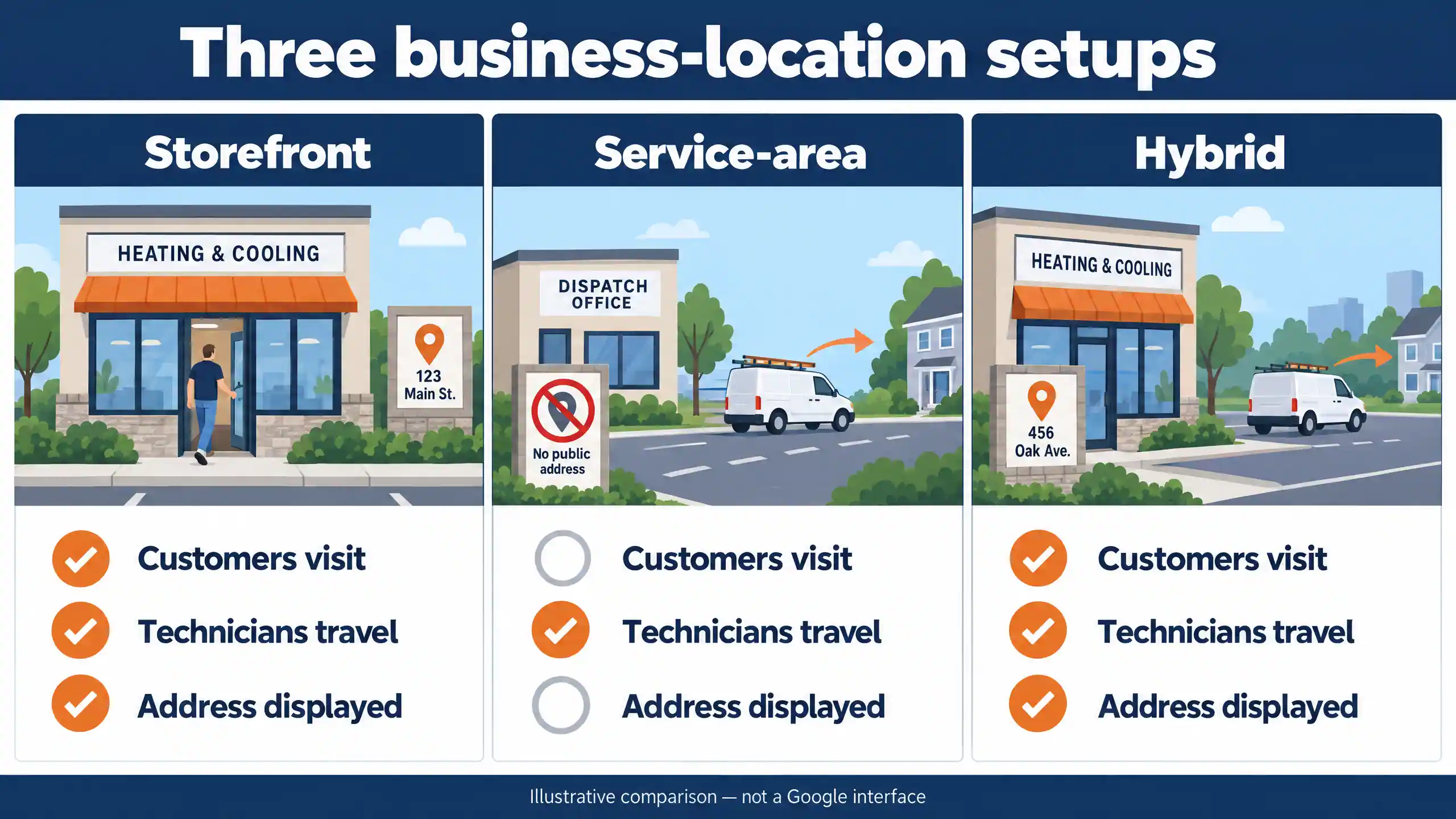
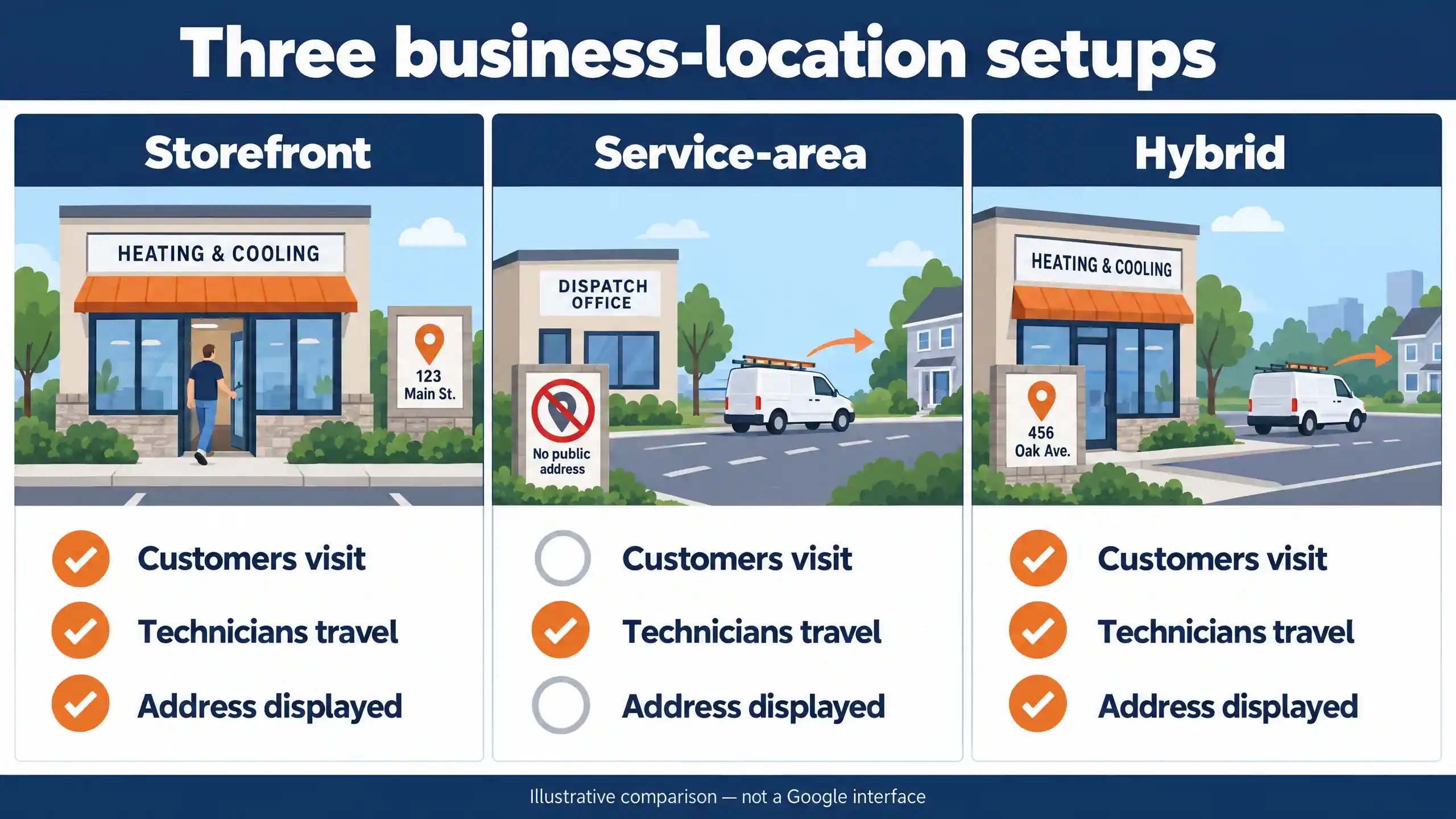
3. Choose the correct location setup
Check: Do customers actually receive service at your address?
Why it matters: A dispatch office is not automatically a customer-facing storefront.
Fix: Match your setup to your operations:
- Storefront: Customers receive service at an eligible business location.
- Service-area business: You visit customers and do not serve them at your address; hide that address.
- Hybrid: You serve customers at an eligible location and travel to them.
Google’s service-area guidance explains these distinctions. A hybrid location needs appropriate signage and genuine customer service at the premises.
HVAC example: A contractor operating from a home office without customer visits should use a service-area setup.
4. Make coverage accurate
Check: Do listed areas match where you accept work?
Why it matters: Overstated coverage creates unsuitable inquiries and dispatch friction.
Fix: Google allows up to 20 service areas using cities, postal codes, or other supported areas, rather than a radius. Its guidance generally limits the overall area to about two hours’ driving time from your base.
KCB recommends checking coverage against staffing and service commitments. Adding an area does not guarantee visibility there; distance remains part of Google’s ranking guidance.
HVAC example: Explain on your website if planned replacements have broader coverage than urgent service calls.
5. Choose categories that describe the business
Check: Does the primary category represent your main business? Are additional categories accurate?
Why it matters: Google says categories affect local ranking.
Fix: Select the most specific suitable option currently available. Use only necessary additional categories—not one for every service. Google’s category guidance also notes that category changes may trigger verification.
HVAC example: Do not add a plumbing category simply because technicians handle condensate drains.
6. Describe actual services clearly
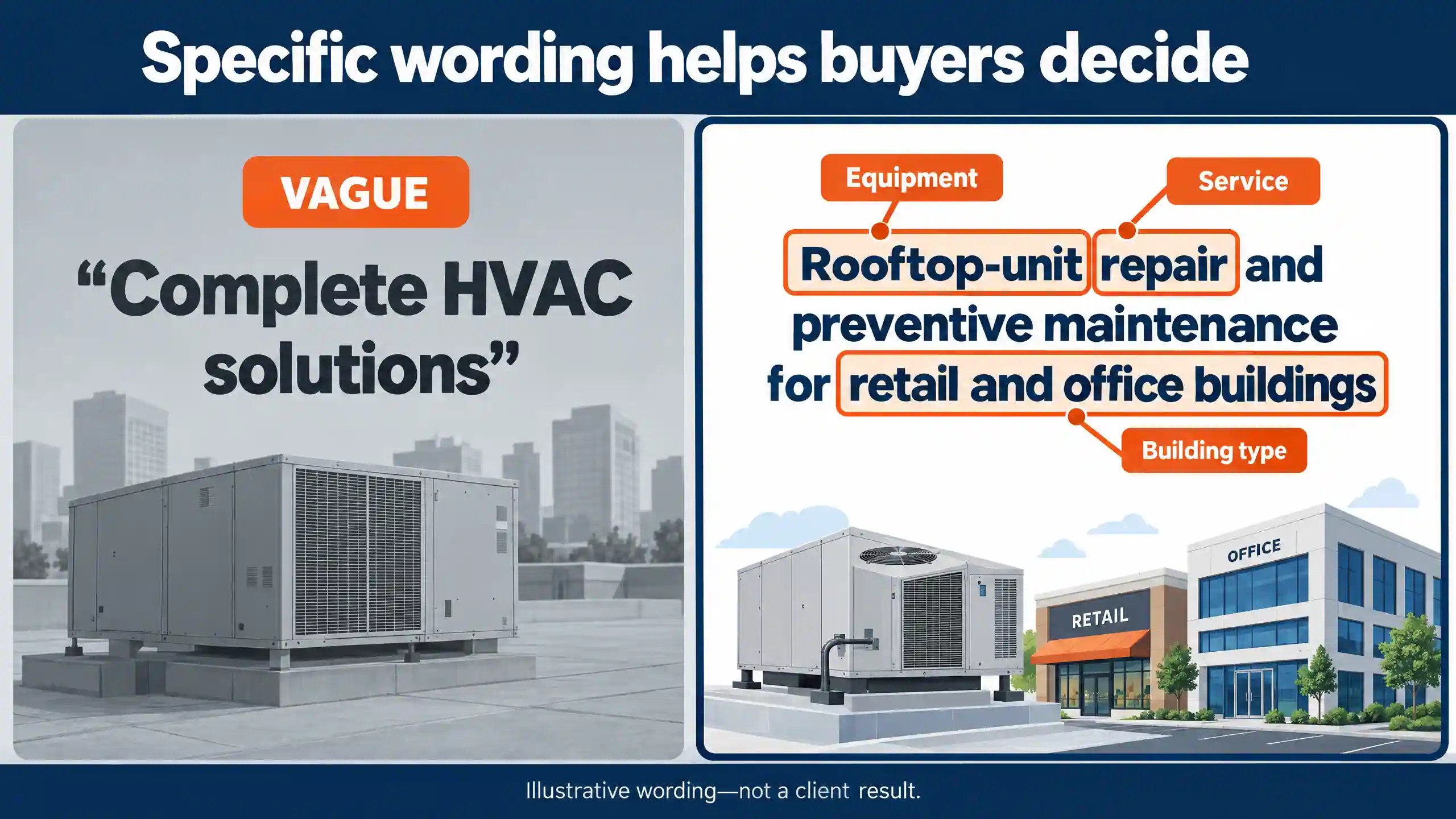
Check: Could a buyer distinguish your capabilities from “heating and cooling solutions”?
Why it matters: General wording leaves buyers guessing.
Fix: Where available, use Google’s services editor for accurate offerings and descriptions. Use the business description to explain your customers, work, and coverage.
HVAC example: “Rooftop-unit repair and preventive maintenance for retail and office buildings” is more informative than “full-service HVAC”—if it accurately describes your work.
Mention only capabilities you provide. Treat specificity as buyer assistance, not a promise that description keywords improve rankings.
7. Align hours with actual availability
Check: Are regular hours, holidays, and emergency-service statements accurate?
Why it matters: Buyers make decisions based on whether help is available.
Fix: Follow Google’s customer-facing hours guidance and use special hours for holidays or exceptions.
HVAC example: A voicemail box accepting messages overnight does not establish 24-hour service. If emergency support is limited to agreement customers, explain that restriction on your website and phone greeting.
8. Test the phone and website destination
Check: Call the listed number and open the website link on mobile.
Why it matters: Accurate information is useful only if the contact path works.
Fix: Google requires a number under the business’s direct control and a website representing the actual business location.
KCB recommends a destination that serves the profile’s audience. For mixed residential/commercial companies, a clear homepage or location page with an obvious commercial route may fit better than a residential promotion.
HVAC example: A facilities buyer should not have to navigate a homeowner-only replacement offer to request rooftop-unit service.
9. Use real photos and credible evidence
Check: Do photos help buyers recognize your people, equipment, and work?
Why it matters: Relevant evidence makes capabilities easier to assess.
Fix: Google’s photo guidance calls for clear, well-lit images that represent reality.
KCB recommends authorized photos of actual projects, with useful context on the website. Protect customer privacy and site-security details.
HVAC example: Show rooftop equipment your team actually serviced. Never present stock or generated imagery as evidence of completed work.
10. Request genuine reviews and respond professionally
Check: Are requests neutral, and are responses helpful?
Why it matters: Reviews help buyers evaluate the company.
Fix: Follow Google’s review guidance. Ask for honest feedback without incentives. Respond calmly and keep private customer details out of replies.
HVAC example: Use a consistent post-service request rather than sending the Google review link only to customers who first report being happy.
Google prohibits selectively soliciting positive reviews.
11. Make commercial suitability easy to evaluate
Check: Can property and facility buyers identify relevant equipment, buildings, and services?
Why it matters: A mixed contractor can appear residential-only despite having commercial capabilities.
Fix: Keep your overall positioning truthful. Make the commercial website section easy to find, with supported equipment, facility types, coverage, and a suitable inquiry path.
HVAC example: List commercial replacement, rooftop-unit service, and preventive maintenance only where offered. Do not imply expertise in hospitals, industrial refrigeration, or every equipment type without the capability to support it.
12. Assign inquiry handling and measurement
Check: Who receives calls and forms? Who follows up?
Why it matters: A working form can still send inquiries to an unattended inbox.
Fix: Assign a primary owner and backup. Test delivery, missed-call handling, and follow-up. Define qualification using service fit, building location, commercial/residential status, and a workable next step.
HVAC example: Route a facility manager’s maintenance request to someone who can confirm coverage and arrange an assessment.
Walk through the buyer’s path
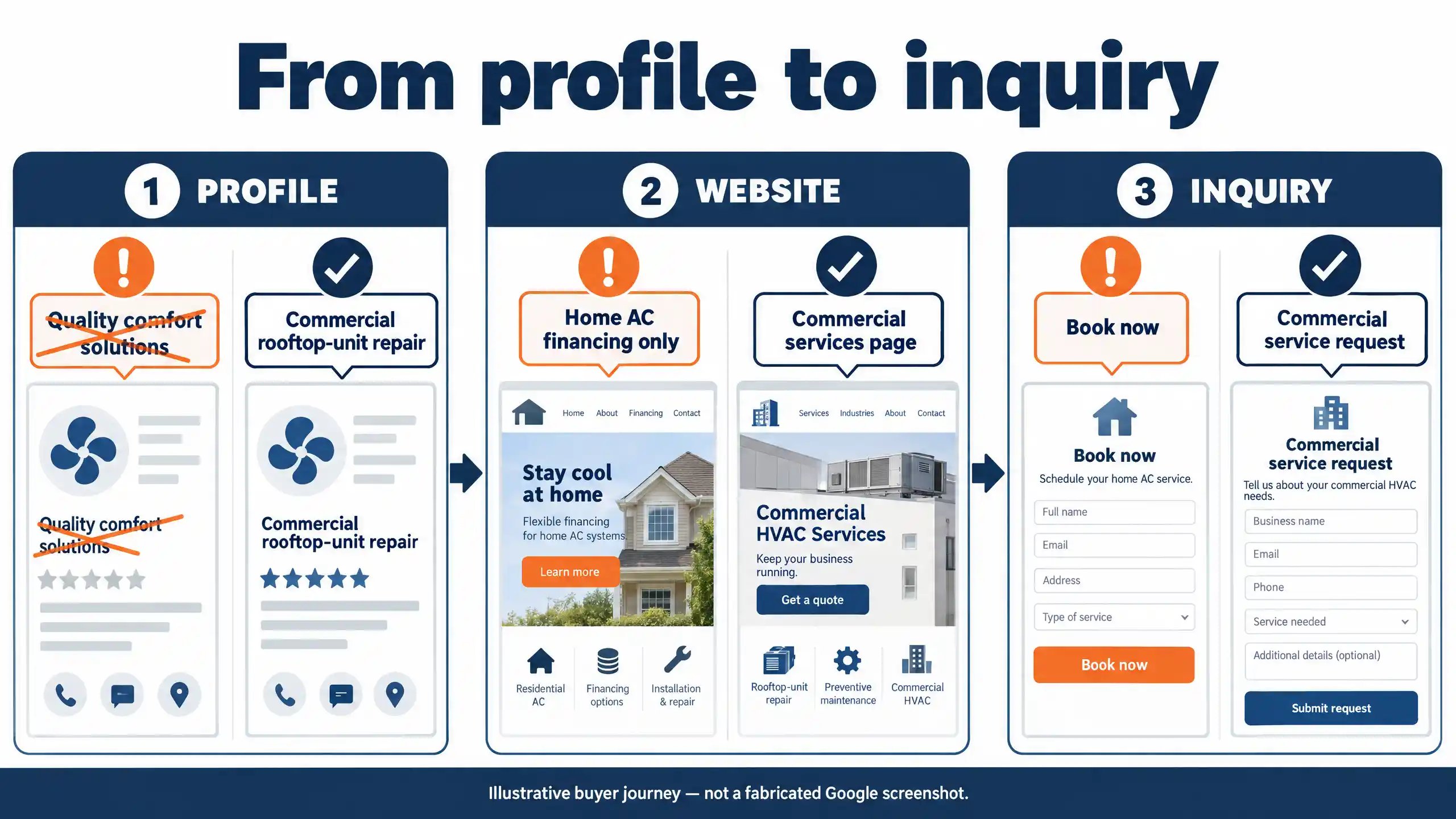
Hypothetical example—not a KCB client: Example Mechanical serves homes, offices, and retail properties.
| Step | Observable confusion | Practical improvement |
|---|---|---|
| Profile | “Quality comfort solutions” does not explain commercial work | “Residential HVAC service and commercial rooftop-unit repair, replacement, and preventive maintenance for offices and retail buildings” |
| Website | Profile mentions commercial services; linked page promotes home AC financing only | Use a relevant business page with clear residential and commercial routes |
| Inquiry | “Book now” opens a homeowner-only form | Offer a commercial service request collecting contact details, building location, and service need |
The wording applies only if those capabilities are real.
A public review can inspect descriptions, pages, and contact options. Ownership, verification, form delivery, response times, and job outcomes require authorized access or internal records.
Common mistakes to avoid
- Keyword-stuffed names: Use the real-world business name.
- Ineligible addresses: A rented mailing address or virtual office without actual operations is not eligible. Coworking locations must meet Google’s staffing, signage, and customer-reception conditions.
- Incorrect address visibility: Hide addresses where customers are not served.
- Misleading categories: Describe the actual business, not desired search terms.
- Inaccurate hours: Match advertised availability to operations.
- Incentivized or filtered reviews: Request genuine feedback without rewards or positive-only screening.
- Calling every interaction a lead: Verify an actual inquiry and its suitability.
Do not treat posting frequency, photo geotagging, or repeated description keywords as established ranking factors.
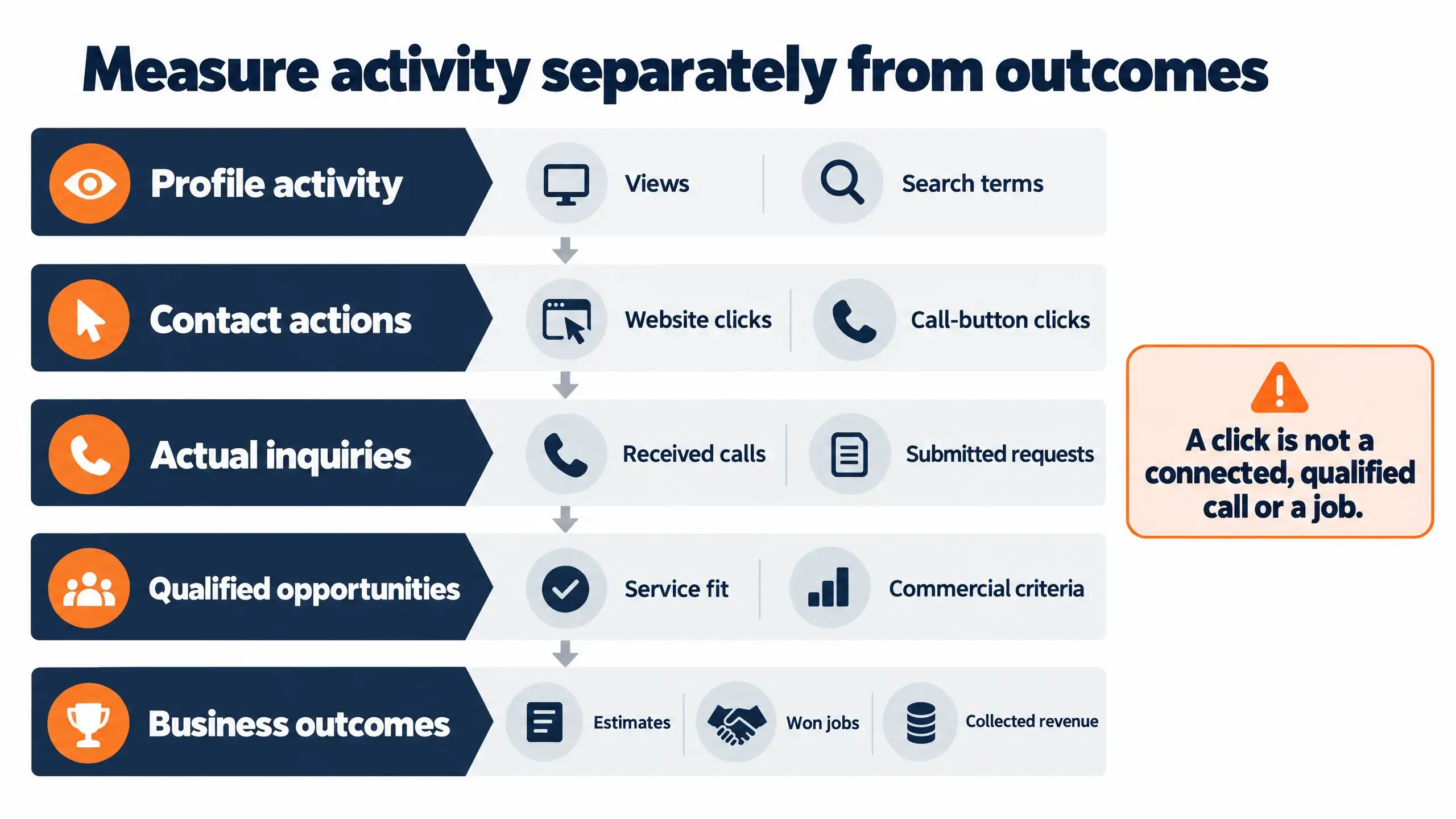
Measure activity separately from outcomes
Google’s performance definitions distinguish profile views, searches, call-button clicks, and website clicks. Available metrics vary; reporting can include activity from organic results and Google Ads.
| Measurement layer | What to record |
|---|---|
| Visibility and profile activity | Profile views and search terms |
| Website visits and contact actions | Website clicks, tracked visits, call-button clicks |
| Actual inquiries | Received calls and submitted requests, excluding spam and duplicates |
| Qualified commercial opportunities | Requests matching your services, geography, and commercial criteria |
| Business outcomes | Estimates, won jobs, and collected revenue |
A call-button click does not establish that a call connected, qualified, or became a job.
Use a simple inquiry log: date, source, service requested, commercial/residential status, qualification, next step, owner, and outcome.
Source tracking helps attribution—connecting inquiries with marketing sources—but does not prove every job resulted from an optimization change.
A practical action plan
Fix first: Have the owner resolve access and accuracy problems. Ask the office manager to test the phone, website, and form delivery.
Improve next: Have operations verify service wording. Assign website updates and select a small set of authorized project photos.
Maintain: Review information monthly and whenever operations change. Monitor inquiries during normal operations, respond to reviews, and review outcomes. There is no need to create an arbitrary daily posting obligation.
Request a focused Google Business Profile review
Request a focused Google Business Profile review from Keep Crews Busy to identify visible gaps and prioritize next steps.
For suitable commercial HVAC contractors, an exploratory performance-based pilot may also be worth discussing. Scope, qualifying jobs, attribution, and payment terms would be agreed before work begins. The pilot is not a proven model or a guarantee of results.